Organizations, Ownership, and Subscriptions
Organizations in Qrvey are a tagging system that enables you to group assets (such as dashboards) with users (defined by clientId). This enables ownership of dashboards, as well as subscriptions within the Download Manager.
Organizations
Organizations, roles, and users are passed through the orgs configuration object. Properties passed in the orgs object are not required entries in the Qrvey database.
An organization can contain its own set of associated roles and users. The default organization (org:0) is the root and cannot be deleted or have its Super Admin role removed. You can create an unlimited number of tenant organizations under org:0. For example:
- org:0
- tenant1
- tenant2
Ownership
Dashboards (excluding Legacy Dashboards) use the concept of ownership. When a user creates a dashboard, they must pass a clientId to identify the user and an orgId to identify the organization the user belongs to.
- If no
orgIdis passed for the user accessing the widget, the platform attempts to define theorgIdby looking for a match of theclientIdin theorgsobject. If no match is found, the platform defaults toorg:0. - If no
clientIdis passed, it is assumed to be anonymous.
By default, when an application is shared, all dashboards within the application are shared with the owner's organization (Edit) and with customer organizations (Use). However, this does not mean that all dashboards are available to all users. For example, org:0 users cannot access dashboards within their customer organization unless they have been granted Content Administration permission.
You can implement sharing features to apply more granular access control.
- In Composer, only dashboard owners and users with Content Administration permission can delete a dashboard.
- In embedded scenarios, dashboards can only be deleted by:
- The dashboard owner.
- A user with the Content Administration permission within their own or their customer organizations.
- If users do not have access to a given application, they cannot gain access to that application or its dashboards, regardless of their role or
orgId.
Subscriptions
In embedded scenarios, schedules and subscriptions are enabled by passing the email property in the JWT.
Note: The
The orgs object determines the list of users available under the Subscribe tab in the Export modal.
{
"appId": "app1",
"userId": "user1",
"email": “client0@qrvey.com”,
"orgId": "org:0",
"clientId": "client0",
"orgs": [
  {
    "orgId": "org:0",
    "users": [
      { "clientId": "client1", "email": "client1@qrvey.com" },
      { "clientId": "client2", "email": "client2@qrvey.com" }
    ]
  },
  {
    "orgId": "org:1",
    "users": [
      { "clientId": "client3", "email": "client3@qrvey.com" },
      { "clientId": "client4", "email": "client4@qrvey.com" }
    ]
  }
]
}
The dropdown only lists users from the same organization as the user accessing the widget.
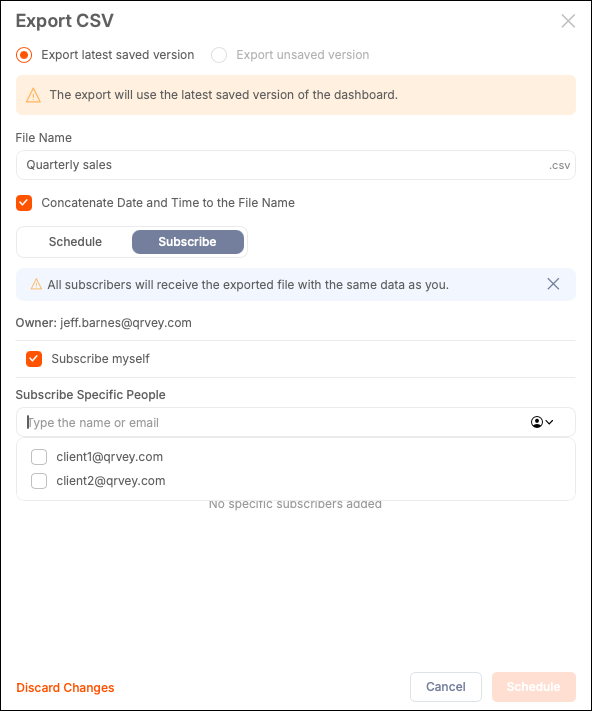
When the orgs object is not passed, users can type emails directly into the Subscribe Specific People field. You can also add external email addresses as recipients.
Note: Roles and users created in Admin Center and available in the Export modal in Composer are not listed in embedded scenarios. The
orgsobject determines the list of users.